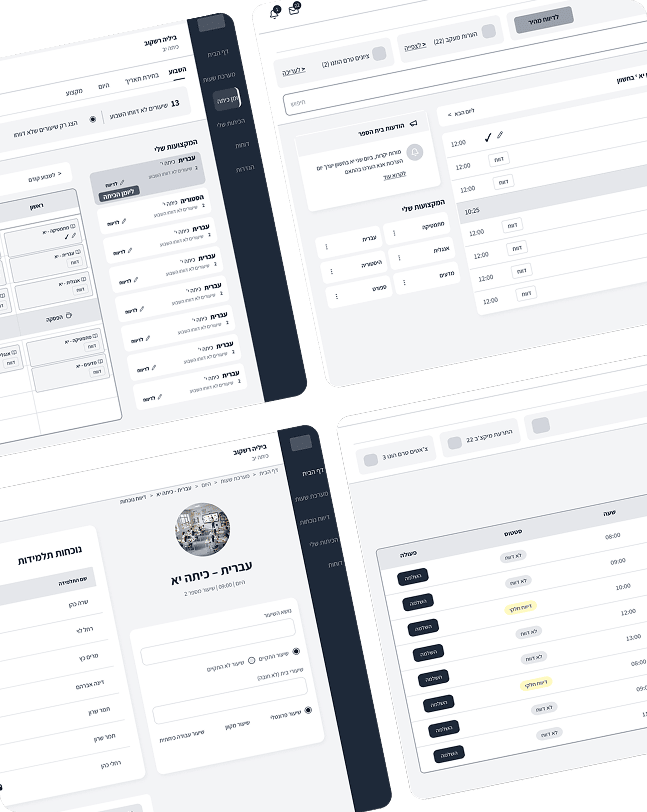
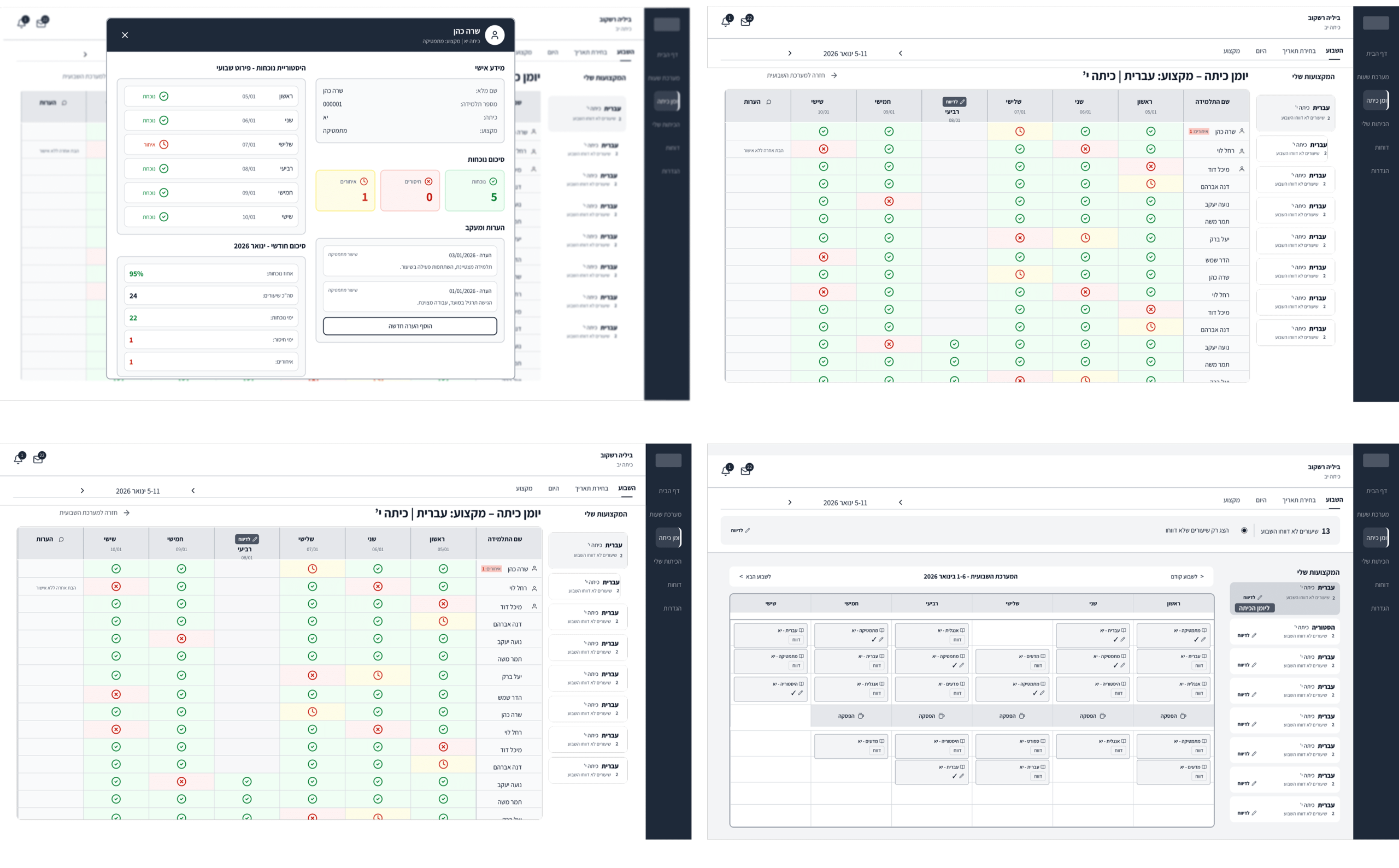
Research, UX design, and redesign of a teacher attendance reporting flow.
Complex system
Redesign
Web
UXUI
Research
User Journey
Prototype
Usability Testing
illustration
Outcome
Usability testing showed 50% fewer clicks and cut reporting time by about 4 minutes
-50% clicks
-4 min
Solution
Refocused on one core flow — clear hierarchy, unified screen, flexible time view
Problem
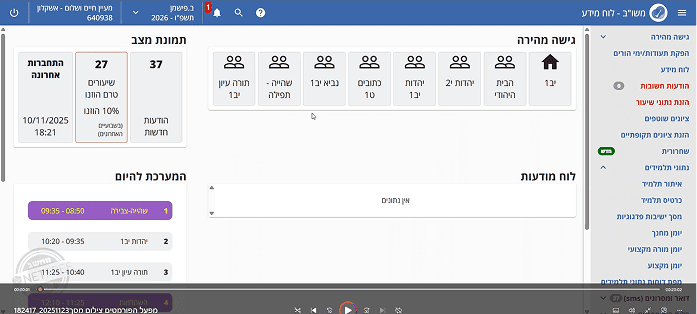
Teachers with low digital literacy face a cumbersome attendance flow, turning a daily task into a cognitive burden
Nice to meet you - Mashov system
The MASHOV System is the official pedagogical management system of the Ministry of Education used in schools across Israel. It supports daily educational workflows such as lesson documentation, attendance tracking, and continuous monitoring.
Since the system is used frequently – both during the school day and later at home after long working hours – its usability directly affects the efficiency, focus, and cognitive load of teachers.
schools across Israel
0
daily users (students & parents)
M1
For teachers with low digital literacy, reporting in the system is often the hardest part of the day.
Problem
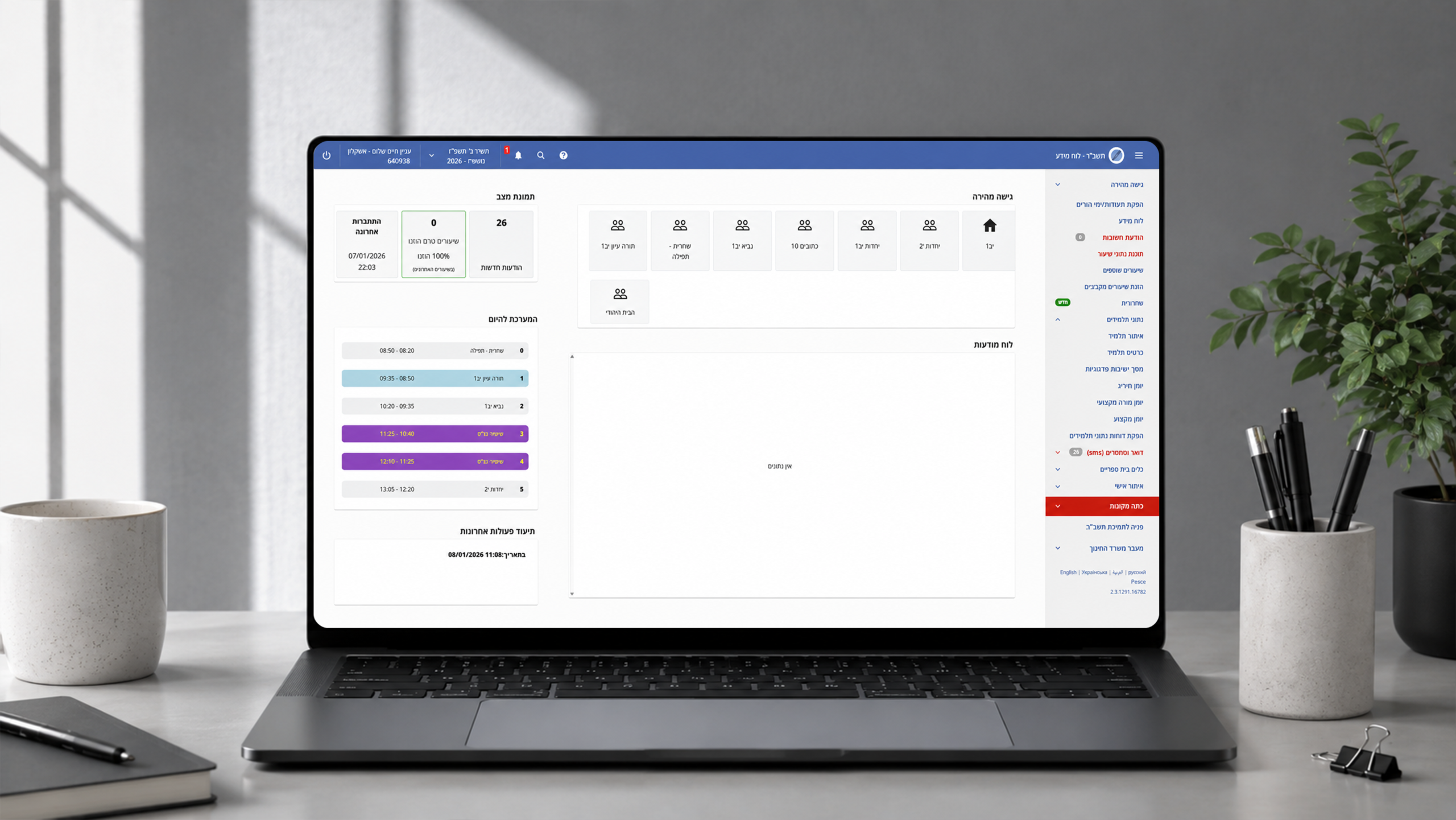
Lack of Clarity, Complex for Daily Use
The system lacks clarity and requires unnecessary cognitive effort for routine daily actions, making consistent use difficult.
Objectives
Improve the visual design and overall user experience
of the system, which is currently perceived as outdated and uninviting.
Position the system as a strong and central school-wide tool
encouraging more schools to adopt it as part of their daily operations.
Encourage consistent and confident use by teachers and students,
reducing friction, delays, and incomplete workflows.
Focus And Opportunity
When reporting feels harder than teaching
Rather than attempting to redesign the entire system, this project focuses on a single, high-frequency interaction: student attendance reporting
Attendance reporting is performed daily, under time pressure, and often after long school days. It represents a moment where usability issues are felt immediately — especially by teachers with low digital literacy. By narrowing the scope to this specific flow, the project aims to explore how small UX decisions can significantly reduce cognitive load, increase confidence, and support everyday work in a large-scale educational system
Research
Market Analysis
Learning from Similar Systems
The study examined reporting and management systems that handle frequent and mandatory daily operations.
Research
User Research
In order to better understand the existing issues in the system, I conducted interviews and observations with several current users.
“It should be here.”
“Just thinking about reporting attendance in the system is exhausting.”
“Look how long it took me to report attendance for just four lessons.”
These observations highlighted recurring friction points in daily attendance reporting.
User Persona
Name
Bila Fishman
Age
54
Position
High School Teacher (12th Grade)
Location
Ashkelon
Technological Literacy:
Low-Medium
Quote
“Just thinking about reporting attendance in the system feels exhausting.”
Goals
Report attendance quickly and clearly
Avoid mistakes and missing data
Complete system tasks without struggling with technology
Background
Veteran, mission-driven educator
A veteran and dedicated teacher who sees teaching as a mission Strong personal connection with students is at the core of her work Began using a personal computer only in recent years Most system-related tasks are done after long workdays
Behaviors
Minimal, Delayed System Usage
Unclear and non-intuitive system structure
Too many options without clear hierarchy
Long processes for simple, daily actions
Feelings of frustration and mental fatigue when using the system
Pain Points
High Cognitive Load
Unclear and non-intuitive system structure
Too many options without clear hierarchy
Long processes for simple, daily actions
Feelings of frustration and mental fatigue when using the system
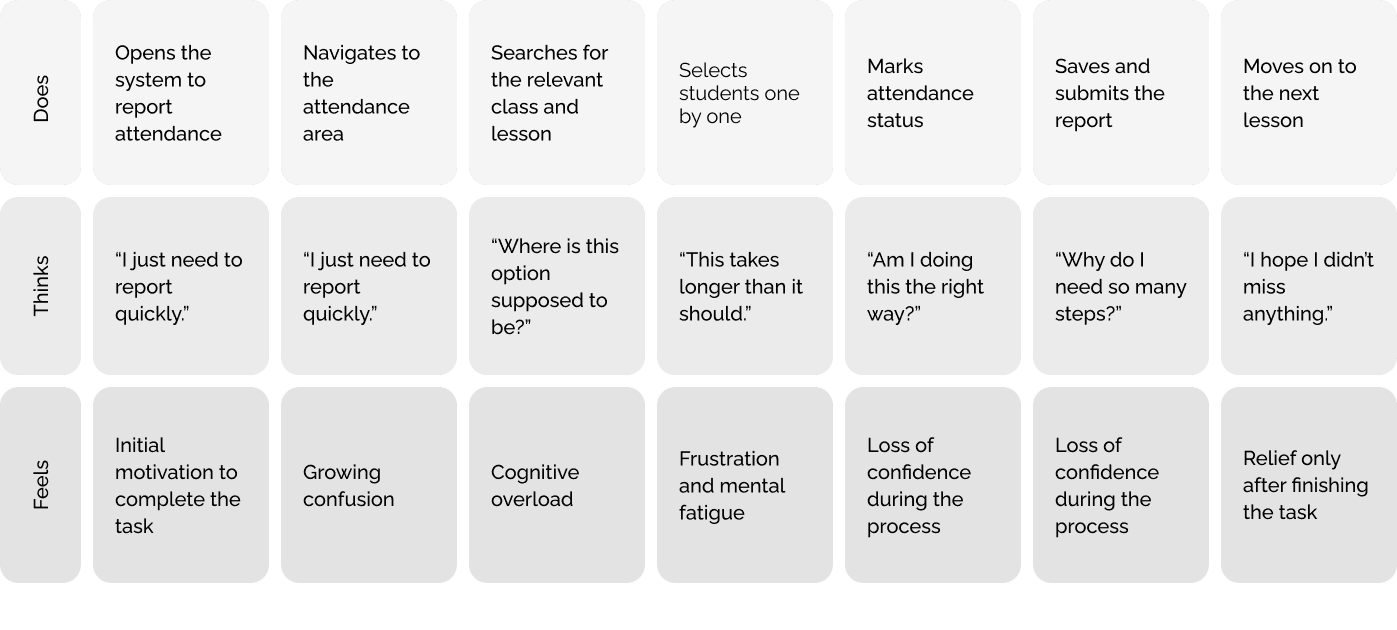
User Journey
Conclusions
01.
Unclear action hierarchy on the home screen
The home screen contains actionable elements, but lacks a clear visual hierarchy that highlights primary actions. Attendance reporting is not immediately perceived as the main daily task upon entry.
02.
Fragmented attendance reporting flow
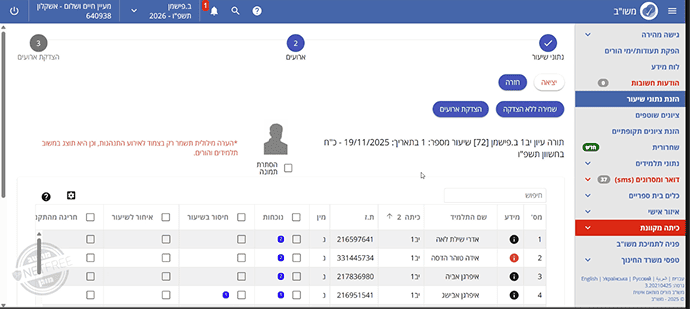
Attendance reporting is spread across multiple screens and menu paths, includes non-essential actions, lacks a clear hierarchy, and uses terminology that does not align with the language commonly used in the education system. As a result, a daily, repetitive task becomes cognitively demanding and error-prone.
03.
A powerful but hard-to-access search tool
The system includes a useful and effective search tool that can significantly support daily work. However, it is hidden within the interface, not easily discoverable, and not integrated into the main reporting flow. As a result, users are often unaware of its existence or avoid using it altogether.
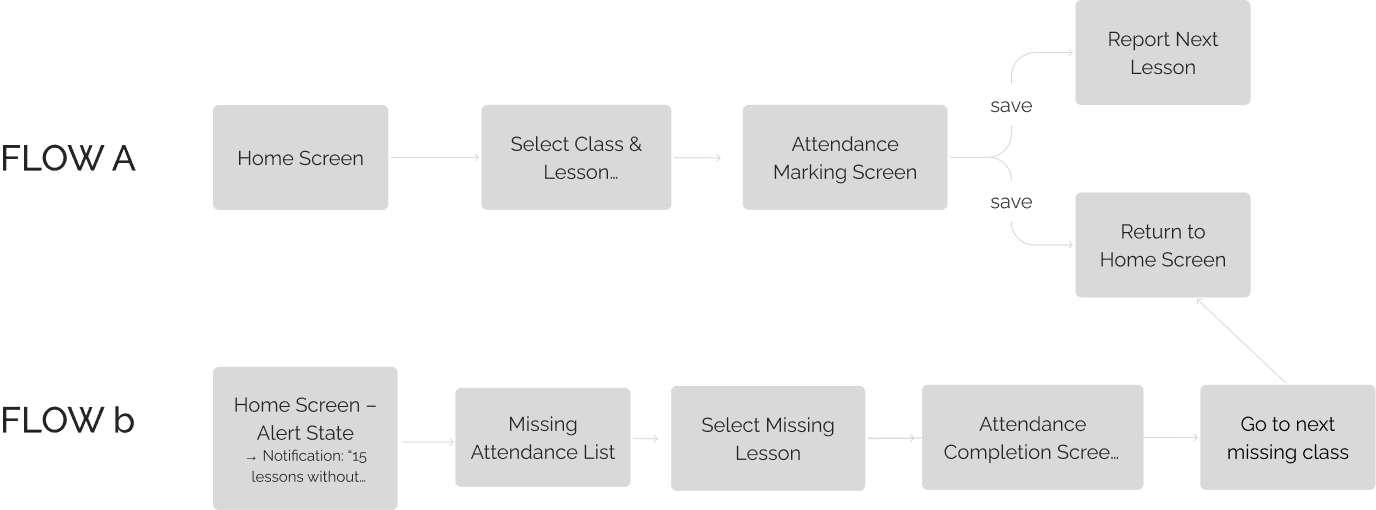
User Flow
Weiframe
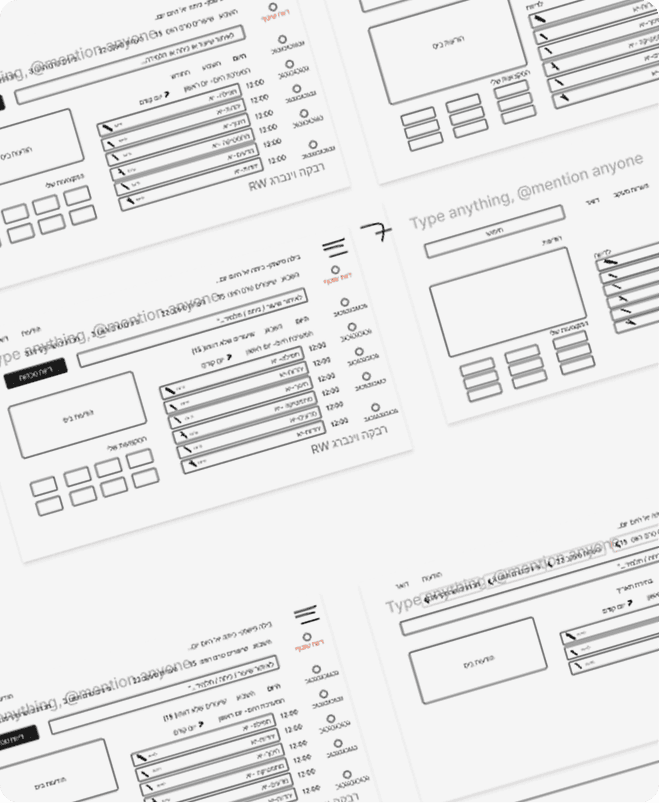
First, I organized all the information relevant to the system. Then, I began by creating initial wireframes for the main dashboard and the attendance reporting screens. Figma Make was a significant help in this process, allowing me to generate the screens from scratch and iterate quickly.
Design
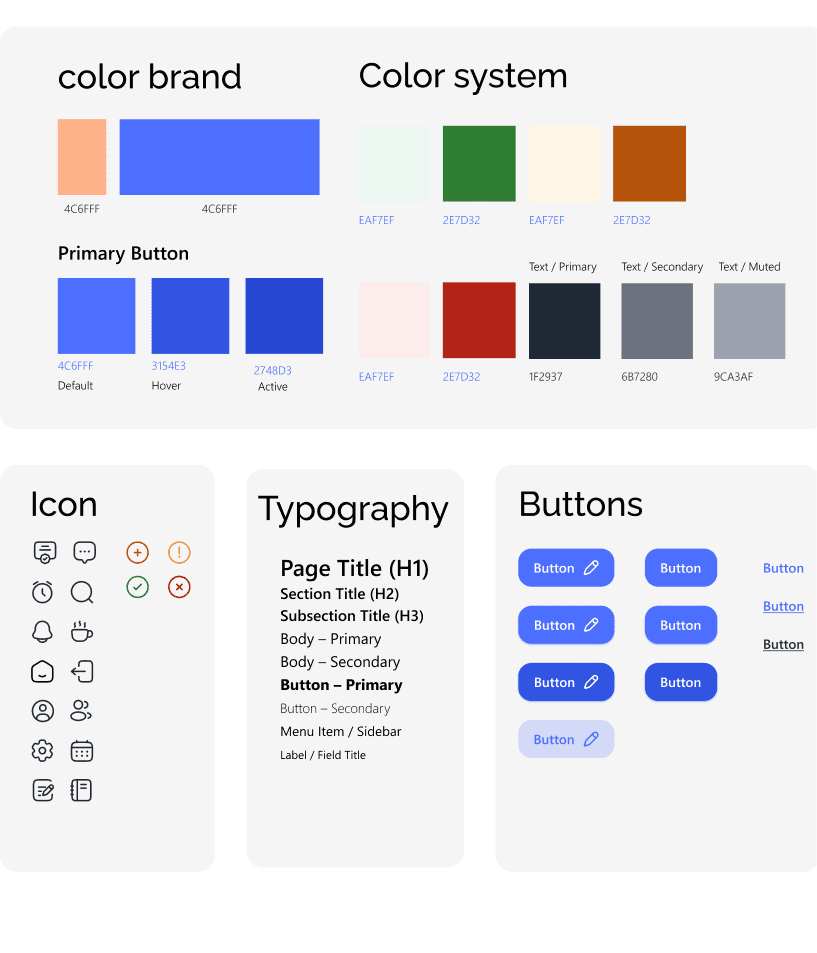
I built a design system with a clear color hierarchy, functional icons, structured typography, and buttons with defined states (default, hover, active) – keeping the interface consistent and easy to scale
Graphic language
I chose a playful illustration style to soften the system's institutional, bureaucratic feel – making it feel more approachable for teachers who find technology intimidating
Screens
01.
Solution – Home Screen Redesign
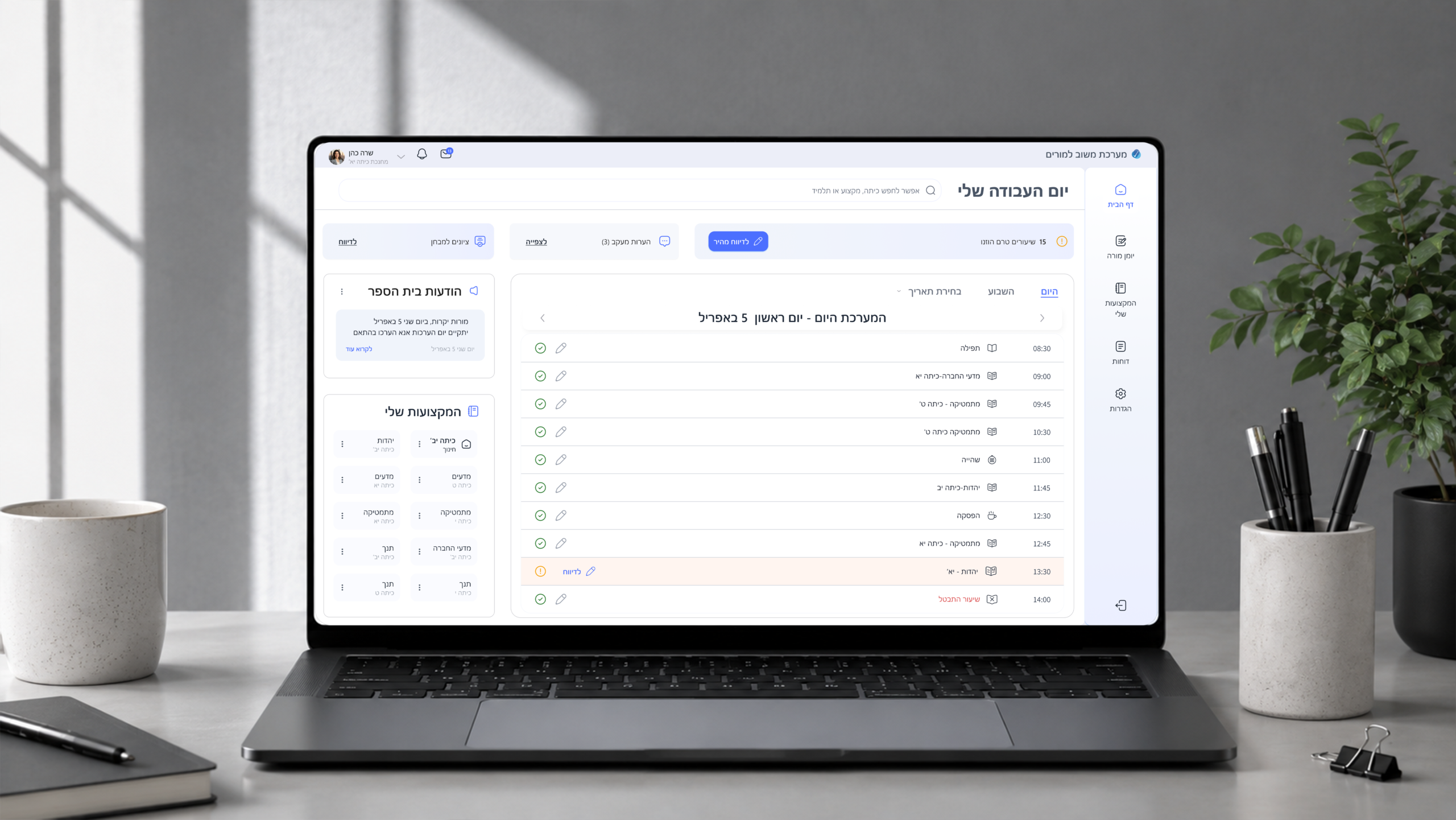
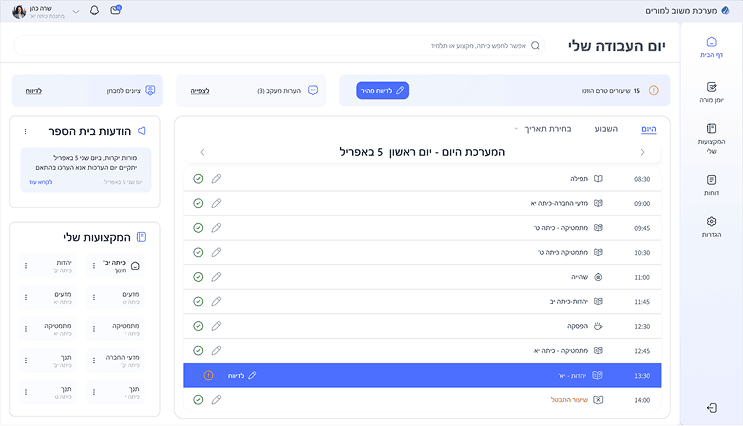
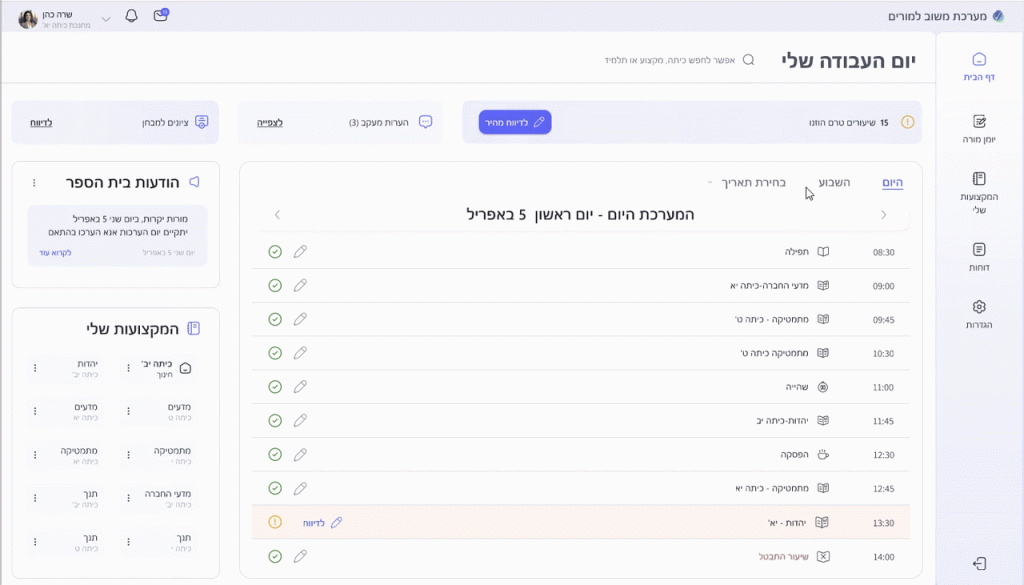
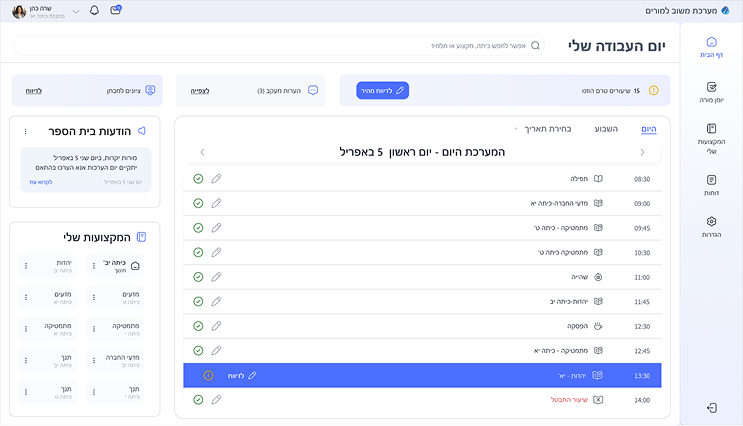
How the home screen addresses the problem? By reorganizing the home screen hierarchy, the system now prioritizes actions at a glance, making it clear what status to view and what action to take. A daily schedule is displayed in the center of the screen. Attendance reporting is displayed as the primary login action, reducing cognitive load and supporting fast, routine use.
Subject Cards
Subject cards group all relevant information and actions per subject. They were positioned as a secondary element to reduce visual overload.
Side Menu
The side menu was simplified to include only key sections. Secondary actions are shown contextually on the screen.
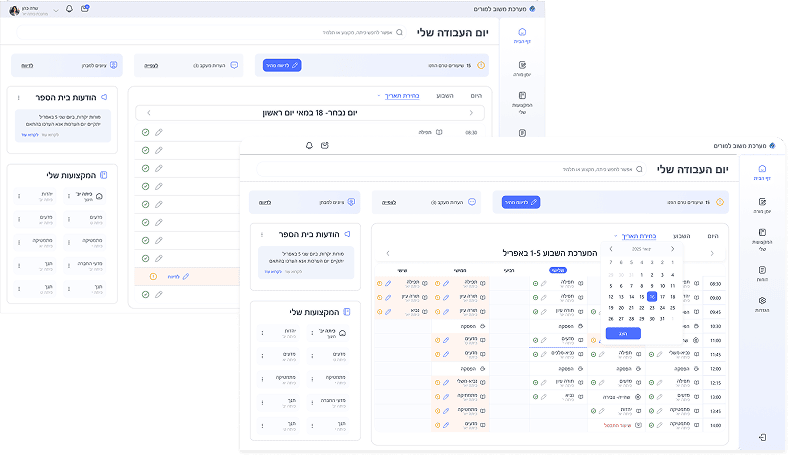
Based on user interviews and observations, I identified that teachers often need to navigate back and forth in time to complete or review reports. To reduce friction and cognitive load, I designed a flexible time view that allows switching between daily, weekly, and specific date views directly from the main screen.
This dynamic time control gives teachers clear ownership over their schedule and reporting flow, without excessive navigation or repetitive back-and-forth actions — making the system easier to manage, especially for users with lower digital confidence…
Dynamic Time View
Schedule Views
The system offers three viewing modes: a Daily View (default) for immediate attendance reporting, a Weekly View for broader schedule overview and retroactive reporting, and a Date Picker for direct access to any specific day.
Across all views, users can easily move forward or backward in time, making schedule management and reporting more flexible and reducing effort in navigating the system.
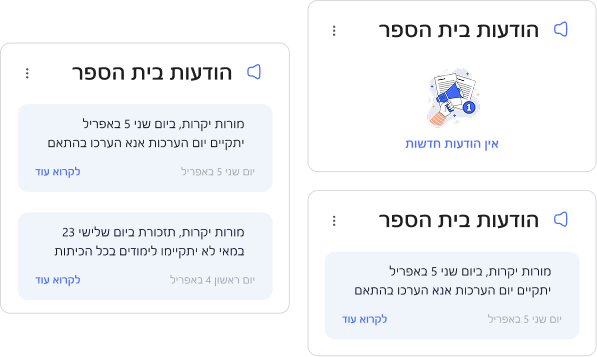
Dynamic Notifications Card
The notifications card was moved from a primary area to a secondary position on the home screen to reduce visual clutter. It expands only when multiple messages exist, reflecting the fact that notifications are not always actively used by schools.
Screens
02.
👉 Solution – Attendance Reporting Flow
A. Happy Flow
This Happy Flow focuses on real-time attendance reporting, performed during the lesson itself, as opposed to delayed or retrospective reporting.
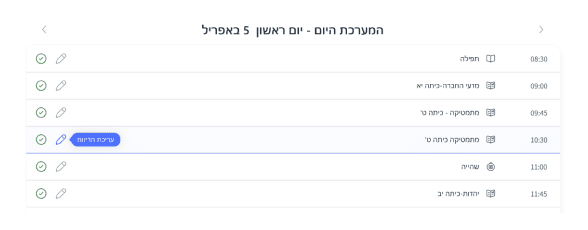
Highlighting unreported lessons from the home screen Reported and unreported lessons are clearly distinguished using status icons. Unreported lessons are highlighted on hover, guiding the teacher to take immediate action directly from the home screen.
Inline editing on hover The edit icon appears on hover, enabling quick adjustments to incomplete attendance reports.
Unified Attendance Reporting Screen
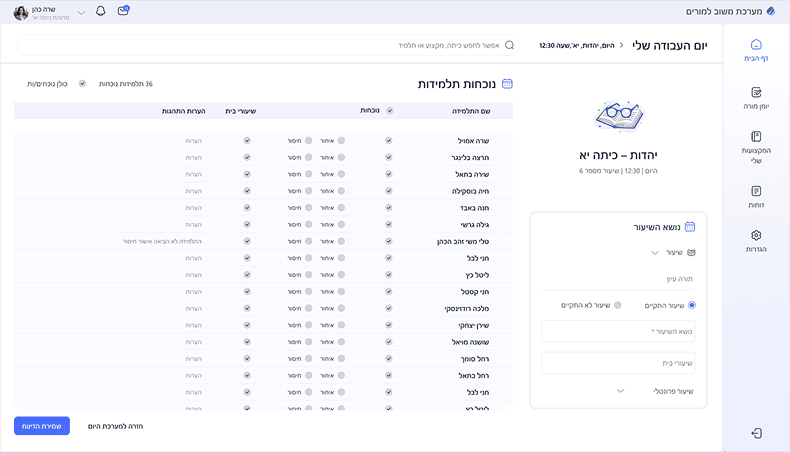
On selecting a lesson from the main screen, the teacher is taken to a single reporting screen that combines all required actions and information.
Student Attendance
A clear list of students with editable attendance statuses, enabling quick and direct reporting.
Lesson Details
Essential lesson information is displayed alongside the attendance list, keeping full context visible at all times.
Attendance Management
Attendance is handled directly on the class screen, with only essential information displayed. Non-critical details such as class numbers and ID numbers have been removed, allowing the interface to focus on simple and clear attendance marking with a strong visual hierarchy.
Screens
02.
Solution – Attendance Reporting Flow
B. Retrospective Reporting Flow
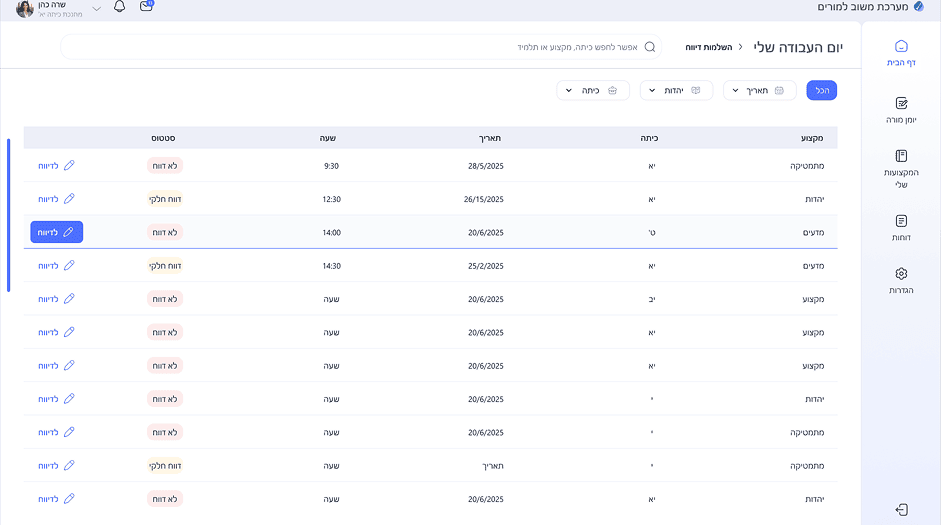
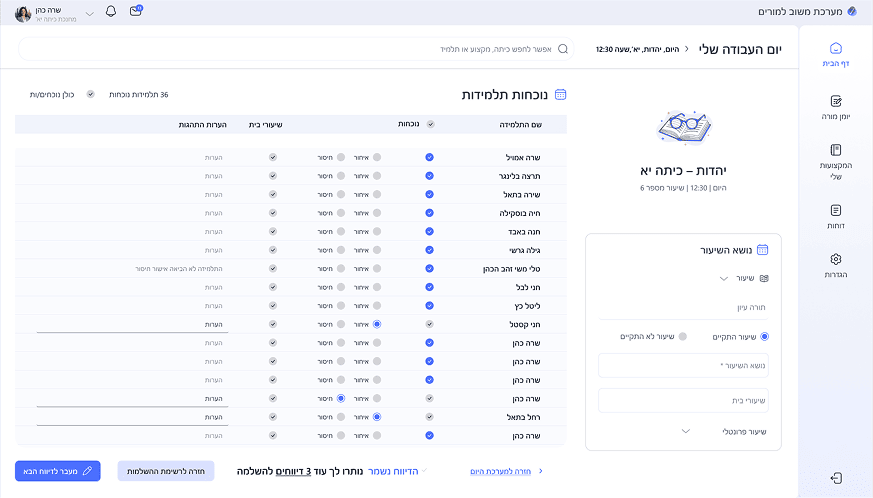
This flow supports reporting attendance after the lesson has already ended. It is designed to complete missing reports from previous lessons in a row, allowing the teacher to review lesson details and update attendance efficiently without disrupting the ongoing daily workflow.
Completion Screen – Attendance Overview
“The research revealed recurring gaps in attendance reporting, highlighting the need for a dedicated screen to manage and complete reports.”
Filtering and Tagging
To support this need, filter tags were added at the top of the screen, allowing teachers to quickly sort reports by status, date, class, or subject. This makes it easier to focus only on incomplete or partial reports, reduce overload, and complete missing entries efficiently without scanning the entire list.”
A clear summary at the bottom confirms completed reports and highlights any remaining ones, guiding the teacher smoothly to the next action
Screens
03.
👉 Search Made Visible
From observations, I noticed that users often look for the search tool, as it is a powerful feature in the system. Therefore, I chose to display it on the home screen, making it easier and faster to access during daily use.
Micro Interactions And Feedback
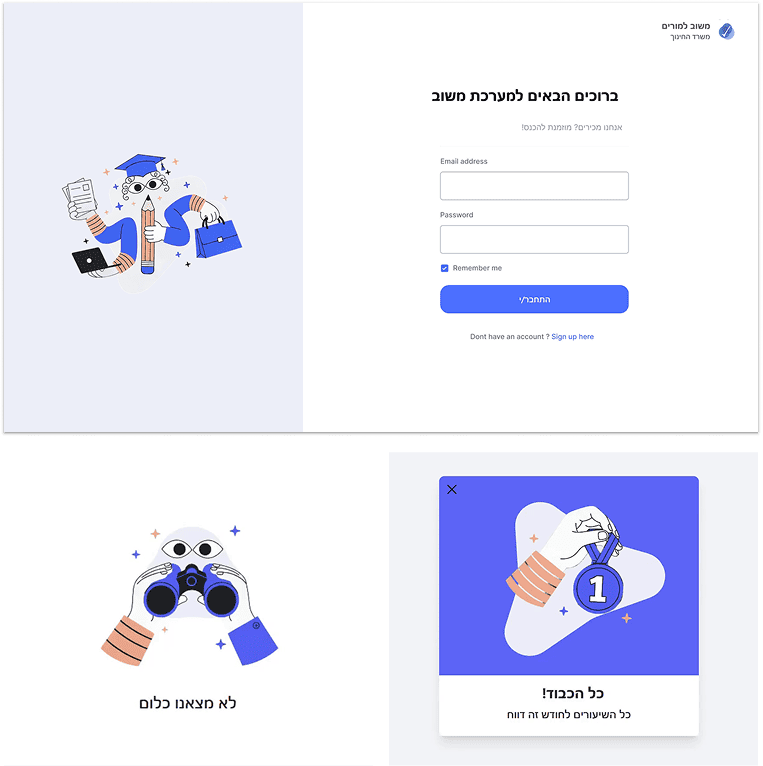
Small UI moments that guide, reassure, and support the user throughout the flow.
Future Feature
Teacher's diary
As part of the UX definition phase, a future feature was specified: a weekly class-level overview that aggregates attendance status, absences, and subject-level insights. This feature is intended to support high-level monitoring and management and is currently defined at the UX level only.
Impact
Turned a fragmented, error-prone daily task into one clear screen – grounded in real teacher pain points, not assumptions. Usability testing with teachers showed 50% fewer clicks and cut daily reporting time by about 4 minutes
"The work is professional and serious – both the research and the outcomes and definition you created. CEO, Mashov